Website · Conversion · marketfeed · 2 months · 2024

Clarity over complexity:
redesigning marketfeed's website
to say less and convert more

The marketfeed homepage was losing visitors before they could understand the product. I led a full redesign — new visual language, mobile-first architecture, and sharper messaging — that turned the homepage into a real acquisition driver.

+18%
CTR lift on sign-up button
↓22%
Bounce rate reduction
76%
Mobile users — now design-first
2 mo
Audit to live launch

01 · The Problem

A homepage that couldn't explain
what the product even did

The marketfeed homepage had accumulated design debt. The main site was dark-themed while other key pages — like the calculator — were light-themed, creating a fragmented, inconsistent experience. The layout was cluttered, the messaging vague, and the call-to-action buried.

Data told a clear story: low conversion on the workshop sign-up form, high bounce rate, and poor scroll depth. When we ran a usability test with 12 existing users, they struggled to articulate what marketfeed actually did within the first few seconds of landing on the page — a fundamental failure for a homepage.

Critically, 76% of our users were on mobile — yet the site was designed for desktop first and never properly adapted. On small screens, the hierarchy collapsed, the CTAs were hard to tap, and the content felt overwhelming.

The core problem: Users arrived with investment intent and left without signing up — not because the product wasn't right for them, but because the homepage failed to communicate its value in the first few seconds.

02 · My Role

Design lead across the
full project lifecycle

I led this project from initial audit to shipped product — owning the research, visual design, prototyping, and final handoff to engineering. The project was a collaborative decision between the data team and the design team, with me driving execution.

My Responsibilities
Usability testing of the existing homepage (12 users)
Competitive analysis & benchmarking
Information architecture redesign
Visual design & Figma prototyping (mobile-first)
3 rounds of iteration & user validation
Engineering handoff & micro-animation QA
Team
Lead — Dheeraj Elamana (me)
Data Team (flagged conversion problem)
Product Manager
Engineering Team
Marketing Team

03 · Discovery & Research

Usability testing revealed a
clarity problem, not a content problem

I started with a structured usability test of the existing homepage with 12 users — a mix of current investors and first-time visitors. The task was simple: land on the page and tell me what marketfeed does and what you'd do next.

Most users couldn't confidently describe the product within 10 seconds. They pointed to three recurring issues: too much information presented at once, a dark visual theme that felt unfamiliar for a financial product, and CTAs that were easy to overlook. Several mobile users mentioned that the page felt "cramped" and hard to navigate with one thumb.

I followed this with a competitive analysis — benchmarking fintech peers and consumer apps known for strong onboarding clarity — to identify proven patterns for communicating product value in a single scroll.

Key research insight: Users weren't confused about whether to invest — they were confused about what marketfeed was offering them. The homepage needed to lead with a single, undeniable value proposition before asking for anything.

04 · Design Decisions

Six decisions that changed
how the page felt and converted

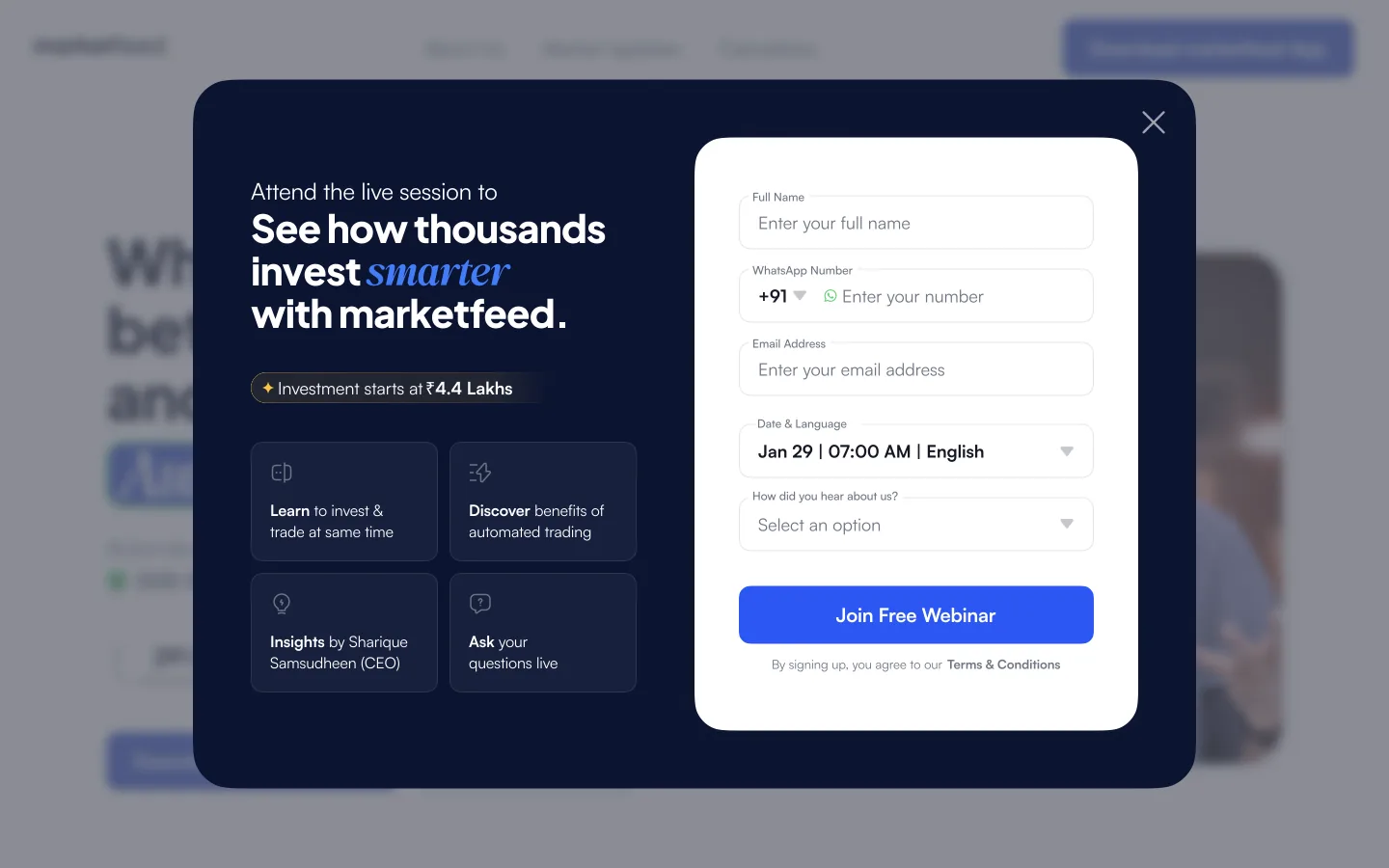
After auditing the old homepage, running competitive research, and sketching initial concepts, I moved into Figma and built a mobile-first prototype. Three rounds of iteration refined the design — each round informed by user testing and internal debate with the product and marketing teams.

1
Light theme — one unified visual language
The dark homepage clashed with the light-themed calculator page, creating a disjointed experience. Switching to a clean, light design system brought consistency across the entire product surface and felt more approachable for first-time investors who associated dark UIs with complexity.
2
Mobile-first information architecture
With 76% of users on mobile, desktop-first was indefensible. I rebuilt the entire IA starting from a 375px viewport — prioritising single-column hierarchy, thumb-reachable CTAs, and progressive disclosure so the most important message always appeared above the fold on any screen.
3
A new hero with one clear value proposition
The old hero tried to say everything. The new one said one thing: what marketfeed does and why it's worth trying. I worked closely with the marketing team on the product pitch — the most debated decision in the project — to land on language that was direct, credible, and action-oriented.
4
Stronger social proof above the fold
First-time investors need trust signals before they'll act. I restructured the page to bring user numbers, ratings, and key credibility markers into view early — removing the friction of having to scroll to find reasons to believe.
5
CTA copy that converted
User testing on the final prototype showed that the updated CTA text — more specific and lower commitment than the old version — significantly improved tap rates. "Try it free" outperformed "Get started" in every test round. Small copy change, measurable impact.
6
Micro-animations, carefully scoped
We tried several animation concepts during iteration — some were too heavy and added perceived load time on mobile. I worked directly with engineering to find the right balance: subtle card entrance animations and a CTA pulse effect that added polish without hurting performance.
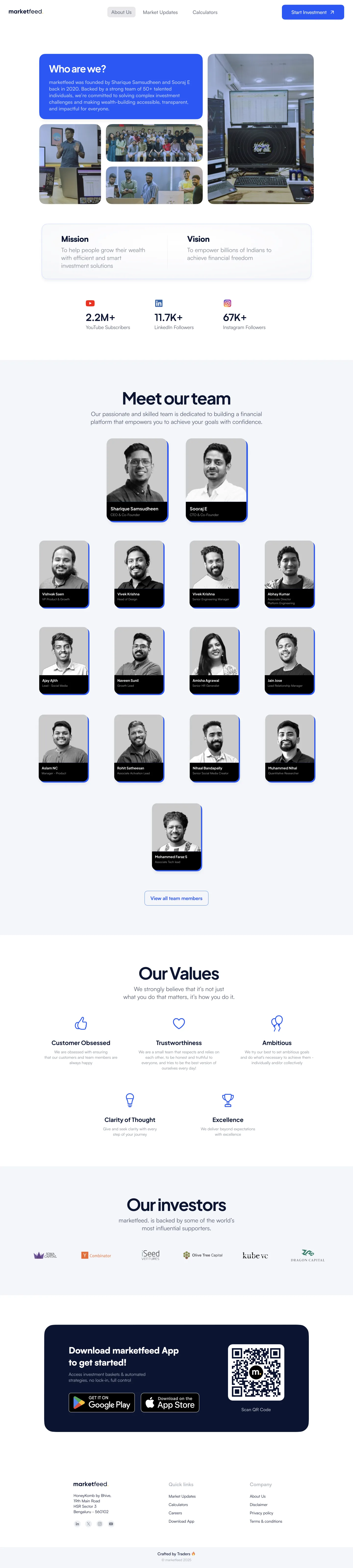
marketfeed.com
marketfeed homepage redesign — full desktop view
marketfeed.com/about
marketfeed About Us page redesign
marketfeed mobile homepage — full scroll

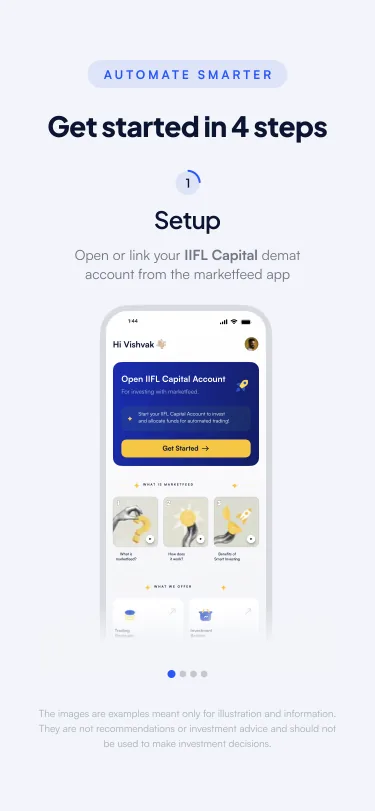
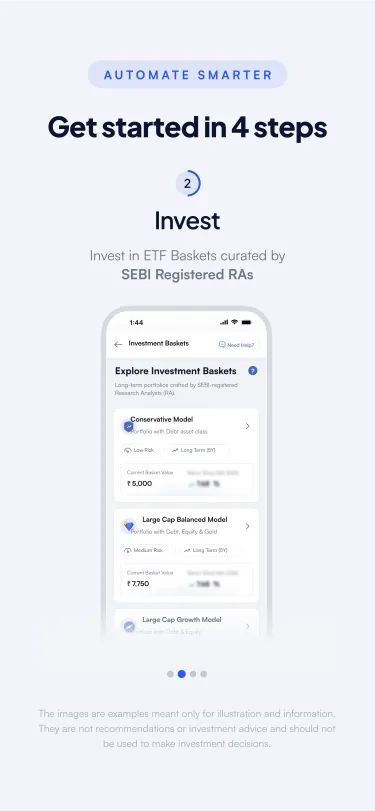
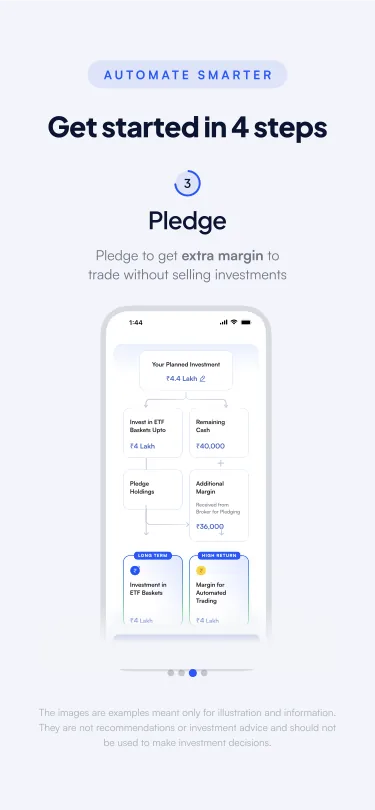
Mobile-first, built at 375px. Every section designed for one-thumb navigation — content stacks cleanly, CTAs stay within reach, and the visual hierarchy drives the eye downward without overwhelming the user.

Step 1
Mobile step 1
Step 2
Mobile step 2
Step 3
Mobile step 3
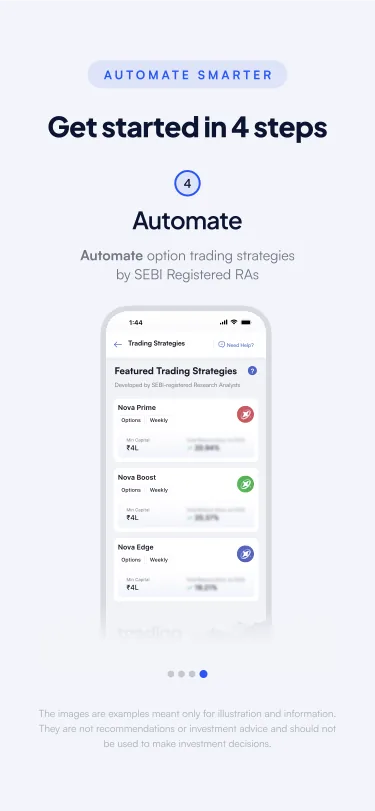
Step 4
Mobile step 4

05 · Before vs. After

Every element revisited,
nothing kept by default

Aspect
Before
After
Visual theme
Dark, inconsistent with other pages
Light, unified across all surfaces
Design approach
Desktop-first, adapted for mobile
Mobile-first (375px), scales to desktop
Hero message
Vague, multiple competing messages
Single, clear value proposition
CTA visibility
Buried below the fold on mobile
Above the fold, high-contrast, thumb-reachable
Social proof
At the bottom of the page
Early in the scroll, near the CTA
Information layout
Dense, parallel sections competing for attention
Progressive disclosure, clear visual hierarchy

06 · Outcomes

A homepage that finally
worked as an acquisition channel

The redesign shipped after 2 months and 3 rounds of iteration. The results validated the core hypotheses from user research — clearer messaging and a mobile-first layout made the page more effective at converting first-time visitors.

+18%
Sign-up CTR
Lift on primary sign-up button after redesign vs. previous homepage
↓22%
Bounce Rate
More visitors stayed and explored after landing on the new page
+35%
Scroll Depth
Average mobile scroll depth improved — users read further down the page

07 · Learnings

What I'd carry
into the next project

Test with real users before debating internally. The most productive moments in this project came after user testing — not from internal discussions. When you have footage of a user failing to find the CTA, the debate about where to place it ends fast.
Mobile-first is not a technical constraint — it's a strategic one. Starting at 375px forced clarity: every element had to earn its place. The desktop design ended up stronger because of it. I'll never design mobile-first as an afterthought again.
Copy is design. The product pitch debate with the marketing team added time, but it was the right use of time. The final CTA copy was the single highest-leverage change — more impact per pixel than any visual decision I made.
Animations need to earn their place on mobile. Several motion concepts that looked great in Figma made the real page feel sluggish on mid-range Android devices. Iterating closely with engineering saved us from shipping something that hurt more than it helped.
Next Case Study
Building a churn retargeting system
that re-engaged 45K+ lapsed users monthly
Read Case Study →